


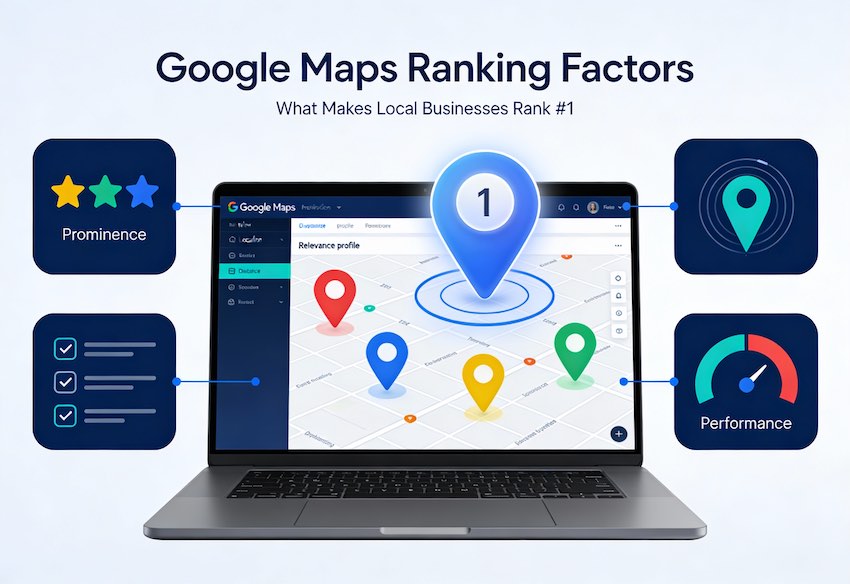
Google Maps SEO can be a masterstroke if you want to attract local customers in your locality. It helps your business show up in your area when local customers are searching and ready to buy the service. With well-planned and Google compliant strategies, local businesses or brands can outperform bigger competitors and turn Google Maps into a regular source of leads.
Google Maps SEO: How to Turn Local Searches into Customers in 2026
When someone nearby searches for “best dentist near me,” “AC repair in San Antonio,” or “digital marketing agency in New York,” they’re not conducting research, they’re ready to act. If your business does not appear near on the first page of Google Maps, that intent (and the sale) will be passed to an opponent.
The good news is that getting better in Google Maps is not magic or luck. It’s a mix of steps that clearly tell Google, “this business is real, active, trustworthy, and the best answer for local customers.” This guide will break down these steps in a pragmatic human manner so that you can begin to use Google Maps as a powerful local sales engine.
What Is Google Maps SEO?
Google Maps SEO is the procedure of enhancing the performance of your Google Business Profile (GBP) as well as your website and overall online presence so that your physical location is ranked higher on local results as well as on the Maps application. Instead of focusing solely on rankings for your website, Google Maps SEO focuses on putting your address visible to people who are close to you who are willing to make a call, visit or make a reservation.
You can see this all the time:
- Someone typed in “cafe near me” and selects one of the top three choices from Map Pack.
- A homeowner types in “plumber in New York” and contacts the first company with excellent reviews and photographs.
Those top spots are not random — they are the result of consistent local optimization.
Why Google Maps SEO Matters for Local Businesses
Online reputation is still important However, most new customers find you on the internet first. If your business’s presence isn’t visible or is not present in Google Maps, many people may conclude that you are less professional or less active, or just not the right choice.
A solid Google Maps presence helps you:
- Be the first to be found when people look up “near me” around your area of service.
- Convert maps into calls, directions and save visits.
- Credibility is enhanced by complete information, pictures and glowing reviews.
The best part is that when the profile is set up and your local signal are properly set up, Google Maps becomes a low-maintenance tool that works for you 24 hours a day, with no ad spending.
Key Factors That Influence Your Google Maps Ranking
Google uses a variety of signals to determine which local businesses will appear at the top of the list. Knowing these signals makes your optimization focus your efforts.
- Relevance: How well your profile and contents match with what people are looking for.
- Distance What is the distance your company is to the user who is searching for it or the exact location they typed in.
- Prominence It is how well-known and reputable your online presence is from reviews or backlinks. Also, mentions.
- Engagement: The number of calls, clicks or requests for directions as well as web page visits coming from your website’s listing tell Google that people are interested in your company.
- Profile completeness: A completely complete Google Business Profile (with categories descriptions, photos, and hours) is more effective than half-full profiles.
- Performance of your website: A speedy mobile-friendly site improves your local presence and helps to achieve more local rankings.
Optimizing around these factors is what turns a basic pin on the map into a top‑ranking local listing.
Very Helpful: How to Drop a Pin Google Maps
Proven Strategies to Improve Your Google Maps Rankings
1. Claim and Fully Optimize Your Google Business Profile
All of Google Maps SEO begins at the top of the details of your Google Business Profile. If you’re not claiming and verifying your account profile, you’re putting your online identity in Google’s (and other people’s) hands.
Steps to take:
- Search for your business by name in Google Maps and click “Claim this business” in the event that an existing profile is available.
- If the profile does not exist If it is not there, create a brand new profile on Google Business Profile. Google Business Profile site and complete verification by mail, phone or video.
- Enter your correct Name Address, Contact Number (NAP) web address hours, categories as well as a full description of your business.
When you’ve mastered the profile you are able to change your information, make offers, reply to reviews and build trust on a larger scale.
2. Keep Your NAP Consistent Everywhere
Minor differences in your company’s address, name, or telephone number on the internet can make search engines confused and undermine the authority of your local area.
Do this:
- Choose one format that is official for your address, name, and telephone.
- Check that the right version is displayed on your GBP, your social profiles, website as well as major directories such as Yelp, Apple Maps, and Bing Places.
- Search for your company’s name plus city, and then update any out of date or incorrect listings you come across.
For older or multi-location businesses cleaning up will have an effect on Maps credibility and visibility.
3. Choose the Right Categories on Your GBP
Categories inform Google the things you do, and this directly impacts the search terms you can get ranked for.
Best practices:
- Create your primary category to be the closest match to your primary product or service (e.g., “Dental clinic,” “Coffee shop,” “Digital marketing agency”).
- Create a few additional categories for services that are important however, avoid unnecessary or uninformed options.
- Examine the top competitors in your field and observe what categories they use to refer to.
A precise category setup is often more powerful than trying to rank for everything.
4. Build a Strong, Recent Review Profile
Reviews are the most powerful signal on Google Maps and also a key factor in trust for humans. Businesses that have more positive, recent reviews usually get more visits and are more prominent in the rankings.
Practical review habits:
- Have happy customers contact you regularly (in person, through WhatsApp or email, or by SMS) by email, text message, or SMS) on your page for reviews.
- Respond to each review, no matter how good or poor to show you’re actively engaged and interested in feedback.
- If you receive negative feedback, be calm and acknowledge the problem and invite the reviewer to continue the conversation in private.
The steady growth of reviews over time appears like it’s more organic than spikes that are sudden, and sends more positive signalling to Google.
5. Use Local Keywords in Your Profile and Website
Local keywords connect what you offer with where you operate — exactly how customers search.
Where to use them naturally:
- GBP description: e.g., “Family‑run bakery in Gurugram offering fresh bread and custom cakes.”
- Services/products section: e.g., “Emergency AC repair in Ohio,” “Teeth whitening in Noida.”
- Website title tags, H1s, and meta descriptions targeted to “[service] in [city/area].”
- Image filenames and alt text that describe the location and type of service.
Avoid stuffing; write for humans first and let keywords support clarity.
6. Post Regularly Using Google Posts
Local keywords link your services to the place you are located — precisely what customers are searching for.
The best place to use them is in a natural way:
- Description of GBP: e.g., “Family-run bakery in London offering fresh bread and custom cakes.”
- Section of Services and Products: e.g., “Emergency AC repair in Dallas,” “Teeth whitening in texas.”
- Title tags for websites H1s, title tags, and meta descriptions geared towards “[service] in [city/area].”
- Images filenames and alt texts which describe the exact location and the type of service.
Avoid stuffed writing. Write for people first and let keywords help to clarify.
7. Use the Q&A Section Proactively
Many companies do not use the Q&A feature of their website, but it’s a great place to gain clarity and build confidence.
Smart ways to use it:
- Create your own FAQs, by asking common questions regarding pricing or parking, services, or other policies.
- Respond to new questions promptly so that people don’t provide incorrect or incomplete answers.
- Include local and service terms in your answers, where appropriate.
Think of Q&A as an extension of your customer support and sales page directly in search results.
8. Upgrade Your Photos and Videos
Pages with powerful visuals consistently receive more clicks and requests than listings that do not.
Focus on:
- Clear photos of your exterior employees, your interior products, and actual clients (with the permission of your customers).
- Update your photos regularly to ensure that your business is current, not stale.
- Videos that show your processes, spaces or the results that will quickly establish confidence.
Name files meaningfully (e.g., “dallas-dental-clinic-reception.jpg”) to reinforce local relevance.
9. Earn Local Backlinks and Citations
Google makes use of mentions and links throughout the internet to determine the amount of reputable and prominent your company is local.
Practical ideas:
- Find reputable directories (Yelp, Apple Maps, Bing Places, Justdial, websites that are specific to your industry).
- Join local organizations and NGOs, or organize events that list sponsors and their partners on their websites.
- Offer to write guest articles or provide quotes to local newspapers and local blog websites, and include the ability to link to your site.
Quality is more important than quantity. A handful of prominent local references can be more important than hundreds of links that look like spam.
10. Embed a Google Map on Your Website
Embedding your location from Google Maps onto your contact or location page strengthens the connection between your site and your GBP.
Steps:
- Find your business through Google Maps.
- “Share” – click “Share” – “Embed a map” and copy the HTML code.
- Paste it on your contact page or dedicated page for your location.
If you have multiple branches, create a separate page with its own embedded map and localized content for each location.
11. Make Your Website Fast and Mobile-Friendly
A majority of local searches and Maps interactions are now performed on mobile devices. A slow or unclean website will send users (and Google) in the opposite direction.
Key improvements:
- Make sure your website looks great on any device.
- Reduce images, clean up scripts and make use of reliable hosting services to speed up loading times.
- Make your telephone address and number clickable by using clearly visible “Call now” and “Get directions” buttons.
Google’s local algorithm continues to reward the user with a positive experience, especially when using smaller screens.
12. Track, Learn, and Keep Adjusting
Google Maps SEO is not a one time job It’s a continual adjustment as your business and competitors change.
Track regularly:
- Google Business Profile Insights: views, calls and direction requests, and web clicks on your profile.
- Review volume, ratings, and the keywords that customers use naturally in their reviews
- Searches for your primary “near me” and “[service] in [city]” searches.
When you see decline in visits or calls, recheck profile reviews, content from local sources and performance of your site to discover any gaps.
13. Use Local Content and Offers to Boost Engagement
Google examines how users engage with their profile such as calls, clicks web-based visits, clicks and directions requests are all indicators that your business is useful and relevant to local users. One of the most effective ways to increase engagement is to align your offerings and content to the current events in your local area currently.
How to do it:
- Create local landing pages or posts that highlight local services, seasonal demands (e.g., AC servicing prior to summer, dental exams prior to school time) Keywords that are targeted to your neighborhood on your website as well as on Google Posts.
- Focus on running location based limited time offers such as “Monsoon AC check-up in California” or “Festive makeover in Texas” directly in your Business profile and review how many visits and calls you get through it.
- Include local landmarks, nearby markets, business hubs, colleges and societies in post to enhance your local relevancy and let your customers know that you are genuinely serving the community..
If your messages and offers are in line with local needs, people click and interact more, sending positive signals on Google Maps and helping you rise higher over time.
How SpiderOrbit Technologies Can Help You Win on Google Maps
For many local businesses, the challenge is not understanding why Google Maps SEO matters — it is finding the time and expertise to do it consistently. That is where a specialist team makes the difference.
SpiderOrbit Technologies can:
- Audit and clean up your existing Google Business Profile and citations.
- Implement local keyword and content strategies tailored to your city and niche.
- Build review-generation workflows and response templates that fit your brand voice.
- Optimize your website for speed, mobile, and local intent so Maps traffic actually converts.
When you are ready to turn Google Maps into a reliable source of leads instead of a missed opportunity, your next step is to align your local presence with how customers already search — and let Spide
SpiderOrbit handle the heavy lifting.




 Search Engine Optimization
 Local SEO
 Web Development
 Content Marketing
 Social Media Marketing
 ORM
ORM