


What I do when I want quick and trusted information?
Just like everyone else — I Google it.
With the majority of global searches running through Google, it has become the most powerful gateway to information, branding, and visibility.
And while we often use Google to look up businesses, products, services, or public figures, many people still don’t realise that you can list yourself on Google too.
This is the place Add Me to Search comes into play — a feature that allows you to create a personalized “people card” and appear directly in Google results.
Imagine it as an online business card designed for today’s world, where being found online isn’t just beneficial but essential.
In this article, I’ll take you through what adding me to Search is, the reason it’s important, and how to make your own personal people card and how you can improve its effectiveness.
What Is Add Me to Search on Google?
“Add Me To Search” is a Google feature that lets people make a public profile with the basic details about them.
It can help people locate them easily when they type in your name, particularly in the case of a professional, an entrepreneur, job seeker, freelancer or creator.
When you create the Add Me to Search profile, Google generates a people card that contains:
- Your name
- A short introduction
- Location
- Work details
- Skills and qualifications
- Social media links
- Website link
- Contact information
- Profile photograph
It’s like replacing your traditional paper visiting card with a dynamic digital profile that’s visible to anyone searching for you online.
This feature shines most when someone shares your name — it becomes your chance to stand out.
Why Did Google Create Add Me to Search?
The reason for this feature is quite simple:
to assist people in controlling the way they appear on the internet and help others to locate the right person by looking for them.
Google designed people cards to:
- Encourage smoother communication
- Improve online discoverability
- Provide authentic search results
- Offer a trusted identity source
- Enhance professionalism and credibility
In a world where everyone searches first and asks later, having a searchable profile becomes incredibly valuable.
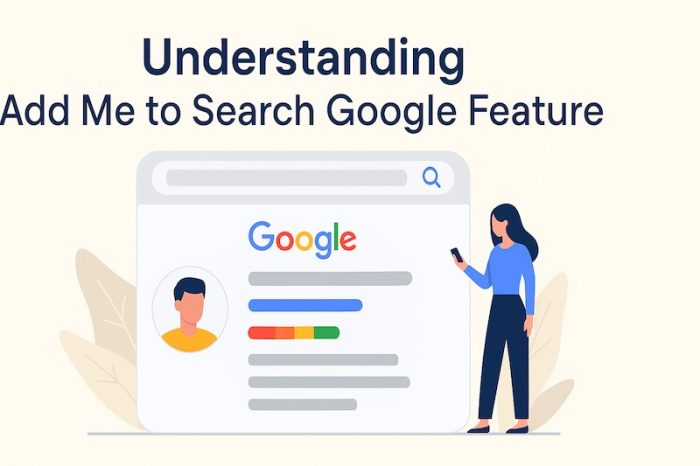
Understanding the Purpose and Power of Your People Card
Once your people card is active, it acts like a mini-profile that appears whenever someone types your name into Google search.
Here’s why it’s powerful:
1. Instant Public Visibility
Anyone searching your name gets a neatly displayed card with your information.
This is extremely helpful if you’re building a professional or personal brand.
2. Boosts Your Search Presence
With millions of searches happening every minute, appearing in search results places you ahead of others who are yet to build their digital footprint.
3. Helps You Build Credibility
Your profile appears directly from Google — making it feel genuine and trustworthy.
4. Direct Communication
You can add your email address, phone number, or website to help people contact you easily.
5. Helps People Find the Right “You”
Many of us share names with other people.
Your people card removes confusion by placing your verified identity at the top of search results.
In simple terms:
Add Me to Search helps you manage your online identity the way you want the world to see it.
Benefits of Using Google Add Me to Search
Below are some core advantages of having a people card:
1. Higher Discoverability
If someone types your name into Google, they’ll find you instantly.
This is crucial for freelancers, influencers, consultants, job seekers, or business professionals.
2. Professional Identity
You can highlight your title, services, achievements, and expertise — helping others immediately understand who you are.
3. Better Networking
A people card helps like-minded individuals reach you through your website, social media, or contact details.
4. Improved Search Quality
Google’s indexing ensures your information appears clean, accurate, and structured.
5. Easy to Connect
People can reach you directly through the verified links and details you share.
6. Personal Branding
You build your presence and reputation with a professional digital footprint.
7. Career Opportunities
Recruiters or clients searching for specialists can discover you and reach out.
8. Increased Engagement
Your card invites more interaction from people seeking your services, skills, or profile.
9. A Stronger Online Identity
You decide what people see when they search your name — and that’s a huge advantage.
10. Google Certification Opportunities
Once listed, you may highlight Google-approved credentials and courses, further strengthening your credibility.
In short, the people card helps you gain visibility, trust, and network growth across the digital landscape.
Essential Guidelines Before Creating Your People Card
Before you begin, Google requires your information to adhere to certain guidelines to ensure authenticity and security.
Here are some key points to keep in mind:
- Be sure to include only information about yourself Do not impersonate other people.
- Make sure you have a current and clear profile photo.
- Make sure your information is accurate and honest.
- Be careful not to share personal information you don’t wish to see publically.
- Don’t add indecent or offensive content.
- Beware of text that is promotional or similar to spam.
- Respect the rights to intellectual property.
Your card is visible to the public therefore it should reflect professionalism and trustworthiness.
Tips to Make Your Google Card Effective
Creating the card is easy — but making it successful requires strategy.
Here’s what helps:
- Provide complete information
- Update your card regularly
- Use keywords relevant to your profession
- Keep your content clear and concise
- Ensure your social links are active and professional
- Maintain a strong introduction
- Add achievements and qualifications
- Keep the tone simple and genuine
The more accurate and updated your card is, the higher its search visibility.
How to Create Your Google People Card
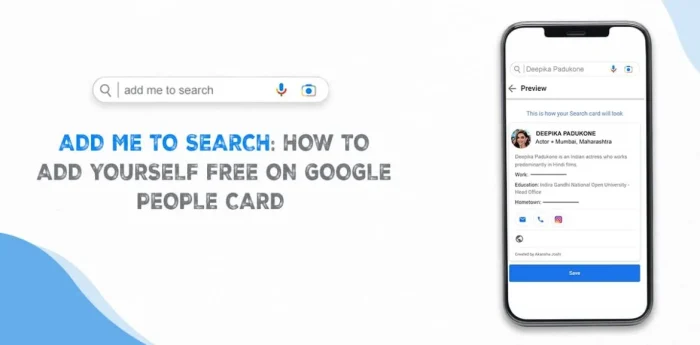
You’ll need:
- A mobile device
- An active Google account
- Web & App Activity switched on
Steps to create your card:
- Open Google on your phone and search “Add Me to Search.”
- Tap on Get Started when the people card option appears.
- Fill out the essential fields: name, location, occupation, and about section.
- Add optional details like website, social links, skills, education, and more.
- Preview your card to ensure accuracy.
- Tap Submit to publish it.
After indexing, your profile will appear in Google search results.
Note: If your name is common, you may need a more distinctive introduction for better visibility.
Eligibility for the Add Me to Search Feature
Currently, Google People Cards are available only in:
- India
- Kenya
- Nigeria
- South Africa
You must:
- Have a personal Google account
- Use English or Hindi as your language
- Be physically located in one of the supported regions
After that, you’re good to go.
Troubleshooting: If Your People Card Isn’t Showing
If your credit card isn’t showing If you’re not seeing your card, follow these steps:
- Make sure the Google Account is active. Google Account is in good standing
- Make sure that the necessary fields are filled
- Take a couple of hours for indexing
- Log out and try for it
- Make sure your profile is updated with more clear information
- Make sure that the language you are searching for is Hindi/English
- If still unresolved, contact Google support
Sometimes visibility isn’t instant -particularly if your name is known or the profile is brand new.
Editing, Updating, or Removing Your People Card
Google makes managing your card simple.
To Edit:
- Open Google Search
- Log in to your Google account
- Search “Edit my people card”
- Tap Edit
- Modify details
- Preview → Save
To Remove Contact Info:
- Delete phone or email fields
- Preview changes
- Save
To Remove Your People Card Entirely:
- “Edit my people card “Edit my people card”
- Select the option to delete my search history from Google
- Confirm removal
Your profile won’t show up in the search results.
How to Make Your People Card Stand Out
With so many cards being created by people You should try to distinguish yours.
There are many creative ways to do this:
- Create a catchy tagline that is eye-catching.
- Include interesting achievements or skills
- Link to a polished website or portfolio
- Use links to social media that are high-quality and reliable.
- Include thoughtful, keyword-rich descriptions
- Make sure details are clear and visually attractive
- Keep up-to-date with the latest news to remain relevant
Your person card is your first digital impression. So, create a memorable card.
Conclusion
The Add Me To Search feature is among the easiest ways to create an effective online presence and be noticed on Google.
Your person card is an online card that displays your personal style skills, knowledge, and achievements to anyone who is looking for your name.
If you’re a student professional or creator this feature can help you gain new possibilities and exposure.
In an age when the first introductions happen online, a well-designed persona card gives you the opportunity to stand out.
Do it now — create your profile and confidently step into Google’s limelight. Google search.
FAQs
What is Add Me to Search?
A Google feature that lets you make a public person card with your professional and personal information.
Why should I create a Google people card?
To increase visibility, strengthen identity, and help others find accurate information about you.
Do I need a Google account?
Yes — an active Gmail or G Suite account is required.
Is the people card safe?
Sure, Google is a strict adherent to privacy guidelines. Only share information that you are comfortable sharing with others.
Can I create multiple people cards?
No. One card can be used for each Google account.
How do I ensure search visibility?
Use accurate details, keywords, complete fields, and update your card regularly.
Also check: Drop a pin in Google Maps



 GBP
GBP GMB Reinstatement
 Web Development
 Content Marketing
 Social Media Marketing
 ORM
ORM